
Frontend deployment
During the backend development, we have learned how to deploy a backend application using Github Actions, Docker, Postgres, Caddy, and Watchtower. In this exercise, we will deploy a frontend application using the same tools. In fact we will use the same Caddy server to serve both the frontend and the backend. There is an easy way and then there is an automated way. The goal in both cases is to build the react project and get the folder with the static files (index.html, js and css etc.) moved from our local dev machine to the server.
Our React Frontend applications are running on the client. This means that we can deploy them on any server, that can serve static files. We will use Caddy to serve our frontend application. So we don’t need to create a docker image for the frontend application. We can simply copy the build files to the server and let Caddy serve from the /site directory.
- Step 1: Build the react app locally:
npm run buildfrom inside the root folder of the application. This will create a new folder in the root of the project called:distin which we will now have the entire frontend application in the form of an index.html file and a folder calledassetswith the minified js file. It is the entire dist folder we want to move to the server (Digital Ocean Droplet) - Step 2: Copy the folder to remote server:
scp dist jetty@<IP or domain>:/home/jetty/deployment/site/<your site name>this will copy the dist folder to your server and name it. NOTE: this will only work if the /home/jetty/deployment/site folder exists remotely, port 22 is open on the server ( sudo ufw status) and thesitefolder must be owned by jetty:sudo chown -R jetty:jetty /home/jetty/deployment/site - Step 3: Add a block in the Caddyfile:
demo.hartmanndemo.dk {
        root * /srv/mydemosite
        file_server
        try_files {path} /index.html
}
- This will make Caddy server look for the application inside its own
srvfolder where the content will be copied to (as the docker container has a shared volume with the/home/jetty/deployment/site/folder) and serve it up on the subdomain from the top line - If you have not setup Digital Ocean domain to use
*.yourdomainyou should do that now to point to your droplet ip - Now restart your docker containers and go to the url and check if your application is online.
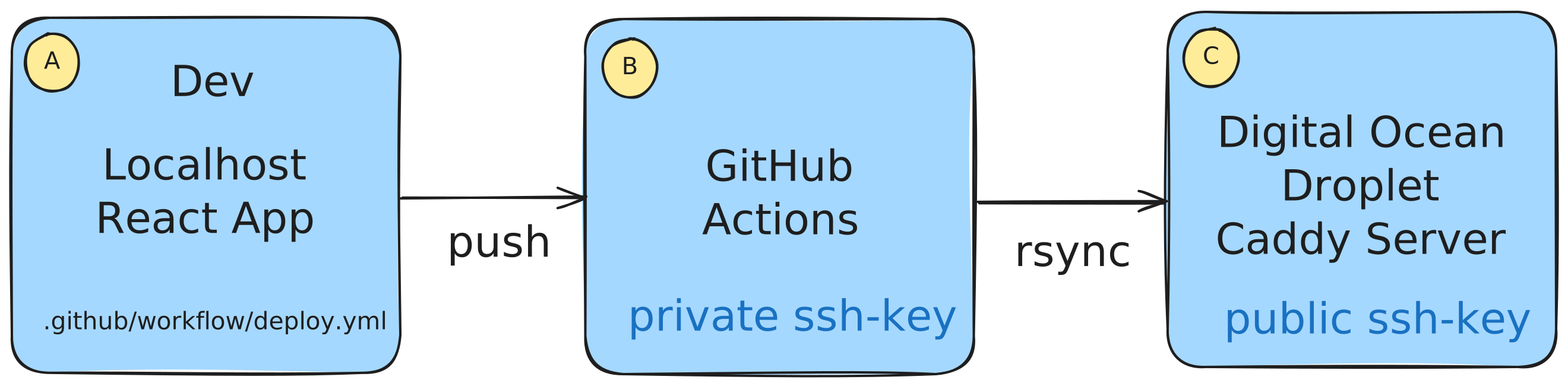
- Find a React frontend application that you want to deploy. Pick a simple one that doesn’t require a backend API.
- Make sure that the application is pushed to a Github repository.
Follow this guide to deploy the frontend application using Github Actions and Caddy.
Find another of your React frontend applications that uses a backend api and deploy it using the same method.
What are the benefits of deploying the frontend and backend applications separately?
What does it mean that the frontend application is running on the client?
What are the benefits of using a static file server like Caddy for serving the frontend application? And what is a static file server?
Why is it necessary to use ssh to copy the files to the server?
How do we make sure that the subdomain is pointed to the correct application?